

Is your website losing visitors before they even read your first line? If so, your page speed is likely the problem. Slow sites push people away fast, and most of them never come back.
This article from Matter Solutions breaks down the exact steps to fix your site’s speed, cut load time, and increase conversions from visitors to paying customers. We’ll explain things like Core Web Vitals, structured data, and browser caching so that you know exactly what to fix and where to start.
Businesses that tackled their website performance head-on using these methods saw real gains in both rankings and conversions. Read on to see how to do it right.
Why Website Speed Affects Your Conversions
Website speed is directly related to factors like bounce rate, session duration, and user trust. That means a slow site can cost you leads before a single word on your page gets read. Most users won’t stick around to find out what you’re offering if a page takes too long to load.
Studies show that a 100-millisecond delay in website load time can hurt conversion rates by 7%. For a business pulling in decent web traffic, that’s a meaningful chunk of lost revenue every single month.
But the impact goes beyond conversions. Fast-loading pages build immediate trust with visitors: they signal reliability. And when someone lands on your site, and everything loads instantly, they’re far more likely to trust you enough to reach out, buy, or book.
Core Web Vitals: What Google Is Actually Measuring
Core Web Vitals are Google’s official set of speed and user experience metrics, and they directly influence where your site lands in search engine results. In short, they’re how Google scores your site’s real-world performance before deciding how high to rank it.
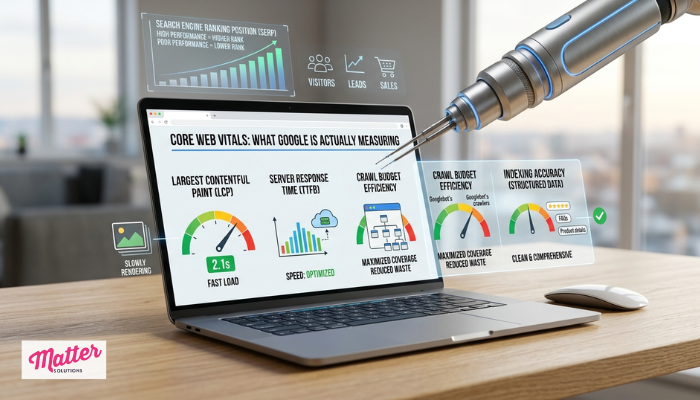
Poor scores on these core web vitals metrics can push you down in search results significantly. Even a small drop in ranking means fewer clicks, fewer leads, and fewer sales.
Here’s a closer look at the four areas that fall under this umbrella:
Page Load Time and Why It’s a Ranking Signal
One of the main things Google tracks is how fast the largest element on your page loads for a visitor. This metric is called Largest Contentful Paint, or LCP. It measures how quickly your main content appears on screen, and it carries serious weight as a ranking factor.
There’s also the question of your server’s response speed. The time it takes for your server to send back the first byte of data to a visitor’s browser affects everything that loads after it. If that initial response is sluggish, your entire loading process slows down, and this matters even more on mobile devices.
How Google Crawls and Scores Your Site
Google assigns every site a crawl budget, which is the number of pages Google crawls during each visit. When your pages are slow, that budget gets used up quickly, and some of your important pages may never get indexed at all.
What’s more, faster sites get more pages crawled per session. That leads to better coverage across your individual pages, stronger indexing, and a much lower chance of Google skipping over content you want people to find.
Structured Data and What It Does for Speed
Most site owners add structured data to get rich results in Google search. Think star ratings, FAQs, or product details showing up right in the search listing. What most people don’t expect is that it also affects how efficiently Google processes each webpage.
Honestly, properly coded structured data gives Google a clear map of your content. Drawing from our experience working with business websites, even adding basic structured data to key pages tends to improve how cleanly those pages get indexed.
The Noindex Tag and Duplicate Content Traps
A noindex tag is an instruction you place on certain pages to tell Google not to index them. Once you use it correctly, it keeps low-value pages out of search and protects your crawl budget for the pages that actually drive traffic.
The problem shows up when noindex tags land on pages you do want Google to index, or when duplicate content forces Google to split its attention across nearly identical pages. All you need to do is sort out both of these issues, and then Google will properly rank your desired pages.
Running a Website Speed Test the Right Way
Running a proper speed test gives you a clear picture of exactly what’s slowing your site down and where to start fixing it. Without one, you’re essentially guessing, and that wastes both time and money.
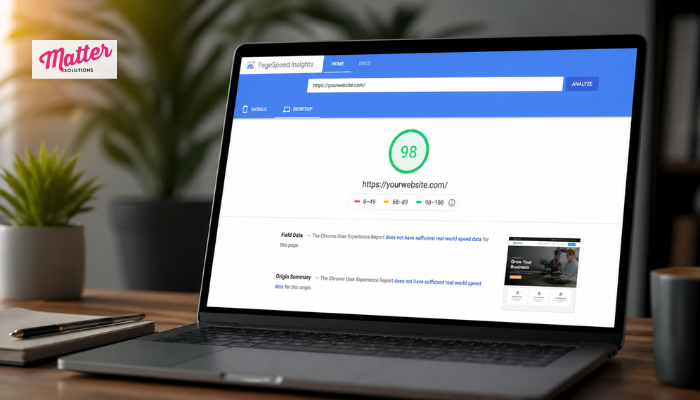
Tools like Google PageSpeed Insights and GTmetrix are a solid first step. They break down your site’s loading process into specific issues. That way, you can prioritize what to fix and stop wasting time on things that aren’t actually hurting your performance.
That said, testing from a single location isn’t always enough. We suggest running your speed test from multiple regions to identify how your site holds up for visitors in different areas. You’d be surprised how often server-related slowdowns only show up in certain locations.
Technical SEO Tips That Cut Load Time Fast
Most load time issues come down to a handful of fixable technical problems, and you don’t need a developer to sort all of them out. A few focused changes can produce a noticeable difference in how quickly your pages load.
Let’s walk through some of the most fruitful fixes to start with:
- Compress Your Images First: Uncompressed images are one of the main culprits behind slow pages. Compressing them before uploading reduces file size without any visible drop in display quality.
- Set Up Browser Cache: Enabling browser cache lets returning visitors load your site faster on every subsequent visit. (In our experience, this one change alone can shave off a significant portion of load time for repeat traffic.)
- Minify Your CSS and HTML Files: If you can minify your CSS files and HTML, you’ll strip out unnecessary characters and whitespace from your code. It streamlines the loading process without changing how your site looks or functions.
Once these are in place, your pages will load more quickly, your visitors will stick around longer, and Google will have a much easier time crawling your site efficiently.
Website Performance in Multiple Languages: What Changes?
First of all, adding a second language to your site introduces new scripts, plugins, and translation layers. Most importantly, each addition can chip away at your load speed in ways that aren’t always obvious at first glance.
Every language version needs its own speed optimization pass. Performance issues tend to vary across different languages. What’s slowing down your English pages may not be the same problem affecting your Spanish or French versions.
On top of that, using a content delivery network helps multilingual sites serve pages faster across different regions. It routes each visitor’s request through the nearest server, which keeps load times low no matter where your audience is browsing from.
How Page Speed Affects Your Search Engine Rankings
Google confirmed page speed as a ranking factor for both mobile and desktop searches. And the more quickly your site loads, the better your chances of climbing those results.
Here’s a quick look at how different load times tend to affect search behavior and rankings:
| Load Time | User Impact | Ranking Effect |
|---|---|---|
| Under 2 seconds | Low bounce rate, high engagement | Strong positive ranking signal |
| 2 to 4 seconds | Moderate drop in engagement | Mild negative impact on rankings |
| Over 4 seconds | High bounce rate, low conversions | Significant ranking disadvantage |
In competitive niches, the relationship between speed and rankings becomes even more pronounced. Two pages with similar content quality will almost always see the faster one outrank the slower one.
That’s just how Google’s algorithm works at this point, and it’s a pattern we’ve seen play out across dozens of client sites.
Your Faster Site Starts Here
Fixing your website speed is one of the most direct investments you can make in your rankings and your revenue. After doing these fixes consistently, you’ll see compounding improvements in how your site performs over time.
The good thing is that most of what we covered here is totally actionable. From running your first speed test to cleaning up duplicate content and setting up browser cache, every step moves your site in the right direction.Matter Solutions offers website speed optimization services built for businesses ready to grow online. If you’d like a hand getting started, reach out to our team, and we’ll take a look at what’s holding your site back.

Contact us
wayhubs@gmail.com